cf_ai_procurement_agent
AI-powered procurement agent that autonomously finds suppliers, sends quote requests, and analyzes email responses to recommend the best pricing deals
An autonomous AI-powered procurement agent that any employee of an enterprise can chat to make a purchse requisition. Procurement AI agent intelligently searches for potential suppliers based on past purchase history (RAG), identifies the right supplier(s), contact suppliers through email asking for current prices (i.e. traditional RFQ, Request For Quote), tracks supplier responses, provide recommendation to end user (employee) about supplier and price, finally with end user approval (human intervention) places purchase order through email. This autonomous Procureement AI agent can replace traditional buyers in a purchasing department.
Table of Contents
-
2.1. End-to-End Process
2.2. Tools/Services Used
-
3.1. Large Language Model (LLM) - OpenAI GPT-4o-mini
3.2. Cloudflare Workers (Edge Compute Layer) - The Core Backend of the Procurement AI Agent
3.4. Cloudflare D1 SQLite Database - Persistent Database for Shared, Long-Term Storage
3.5. User Interface & Input - React Chat Interface (Cloudflare Pages + Vite) Frontend
-
Installation Instructions - How to Run
7.1. Prerequisites
7.2. Development Setup
7.3. Building and Deploying for Production
7.4. Database Schema
The Business Problem
Every enterprise will have dedicated procurement (purchasing) department responsible for sourcing and purchasing the material and services for the company employees. Often companies need to hire/staff the procurement team to manage this process.
With autnonomous Procurement AI agent, it can self-serve employees, reduces the administrative burden on buyers thus improving the productivity and reducing the number of buyers needed in a purchasing department. This would also reduce cycle time of procuement process.
The Solution
This AI-backed procurement agent automates the entire sourcing process end-to-end. The AI agent intelligently searches the parts catalog to find appropriate suppliers and will automatically send RGQ (Request For Quote) emails to suppliers, receiving and processing their responses in real-time via email webhooks. AI agent makes a purchasing recommendation to the employee (original requestor) with price and delivery date. Upon requestor confirmation, AI agent places purchase order by sending email to the selected supplier.
Instead of procurement teams manually searching, emailing, tracking responses in spreadsheets, and compiling reports, which can take days and weeks, this procurement AI agent does all of this autonomously in minutes, providing instant access to supplier options so businesses and customers can make faster and better-informed purchasing decisions
In the future this solution can extended to expedite/follow-up and track the shipment delivery and communicate to requestor
End-to-End process
-
Requestors (typically employees of the organization) describe what they need (e.g., “100 wireless keyboards”). The AI agent searches parts catalog (enterprise ERP or procurement system) to identify all suppliers who supplied matching parts in the past, eliminating the need for manual supplier search
-
The agent automatically generates professional emails and send to the available suppliers, indicating interest in purchasing such part from each supplier. Emails are sent to all suppliers simultaneously, ensuring consistent information to everyone instead of individual emails sent manually
-
When suppliers respond via email, the system automatically receives and processes responses through webhooks. Prices are extracted from email text, and responses are stored in a deduplicated database
-
Employees check the chat for supplier responses by polling messages. The system stores supplier quotes in the database, and employees can ask the agent to check for responses
-
The agent analyzes all supplier responses and provides intelligent recommendations about which supplier offers the best value, fastest delivery, or other criteria. Upon requestor confirmation, AI agent will send purchase order confirmation to the selected supplier.
Tools/Services Used
- LLM: OpenAI GPT-4o-mini for autonomous decision making
- Backend Orchestration: Cloudflare Workers and Durable Objects for stateless routing and stateful coordination respectively
- Database: Cloudflare D1 SQLite for persistent storage that integrates with other Cloudflare services like Workers and Durable Objects
- Email: Resend API for RFQ email sending and webhook notifications for email responses from suppliers
- Frontend: React + Vite for the chat interface
Technical Explanation
The Procurement AI Agent is built with these core technical components
Large Language Model (LLM) - OpenAI GPT-4o-mini
- Powers the autonomous agent that will understand procurement requests in order to make intelligent sourcing decisions
- Calls various tools that were developed (supplier search, email sending, response analysis) based on business/employee intent
- Analyzes supplier responses and generates recommendations for the best price to purchase
- GPT-4o-mini was chosen for three primary reasons:
- Significantly lower cost per API call compared to GPT-4, making high-volume procurement operations economically viable (enterprises send 100s of RFQs daily)
- Excels at understanding and calling tools autonomously, which is important since the Procurement AI Agent must intelligently decide when to search for suppliers, send emails, and analyze responses without human guidance
- Handles complex supplier analysis, pricing negotiations, and multi-supplier comparisons, while remaining as a reliable and consistent LLM for major business operations
- Responses are typically very fast, meaning employees get recommendations quicker, improving procurement cycle time
Cloudflare Workers (Edge Compute Layer) - The Core Backend of the Procurement AI Agent
For procurement, speed and cost matter a lot. Without Workers, a procurement request from an employee in Singapore and another in San Francisco would both be routed to two different servers. Cloudflare Workers run at Cloudflare’s 200+ global edge locations, where employees can get responses within milliseconds regardless of location.
Additionally, Workers integrates well with other Cloudflare services, including Durable Objects and D1, eliminating network latency time between layers.
Workers also works to handle webhooks instantly. When Resend notifies about a supplier response, the Worker processes and routes to the correct Durable Object in milliseconds, ensuring real-time chat updates.
I used Cloudflare Workers to handle three core functions:
- Chat Request Routing - Routes employee chat messages to the correct ChatAgent (Durable Object) instance
- Webhook Processing - Receives supplier email responses from Resend, extracts pricing, queries D1 to find the right session, and notifies the ChatAgent
- Session Coordination - Manages session creation, deletion, and listing through the AppController
Cloudflare Durable Objects (Stateful Coordination Layer) - Works with Cloudflare Workers to Maintain Session State
Without Durable Objects, every message from the employee, every webhook from a supplier, and every LLM response would require querying the database in order to maintain state. With hundreds of employees making procurement requests simultaneously, this creates massive latency and bottlenecks at scale (each database query adds 10-100ms round-trip time).
Durable Objects solve this issue by maintaining state in-memory with automatic persistence, including conversation history, supplier list, and LLM context live in the object’s memory, giving instant access long latency round trips
They also guarantee single-threaded execution, meaning race conditions will never happen (i.e., two supplier responses arriving simultaneously for the same request). In the context of procurement, where real-time supplier response notifications must update the exact right conversation instantly, Durable Objects are ideal: the Worker receives a webhook, routes directly to the correct Durable Object instance, and state updates immediately without any database contention
AppController (app-controller.ts): Application-level coordination Durable Object
- Manages global application state and user sessions across the entire system
- Tracks all active procurement requests and their associated sessionIds
- Maintains a registry of which ChatAgent instances exist and their status
- Handles session lifecycle: creating, updating, deleting, and listing all sessions
- There is only one AppController instance per deployment (singleton pattern) that coordinates everything
- When Workers need to know which sessions exist or create new ones, they query AppController to retrieve state
ChatAgent (agent.ts): Session-specific agent Durable Object
- Each procurement request gets its own ChatAgent instance (identified by sessionId)
- Maintains persistent state: conversation history, current model, supplier contacts, and procurement context
- Routes incoming chat messages to ChatHandler for OpenAI LLM processing
- Receives webhook notifications from Workers and automatically updates chat with supplier responses
- Guarantees single-threaded execution (no race conditions when multiple messages arrive for same session)
- Data is automatically persisted—even if the instance is paused, state survives and resumes instantly
- Each ChatAgent is independent; 1000 employees = up to 1000 ChatAgent instances running simultaneously
Cloudflare D1 SQLite Database - Persistent Database for Shared, Long-Term Storage
Helps stay entirely within Cloudflare, allowing each service (Workers, Durable Objects, etc.) to communicate fast. D1 is SQLite running on Cloudflare’s global network, so the database is able to quickly queries from a Worker.
Without D1, I’d need a traditional database service like Postgres or MongoDB, which comes with critical problems for real-time procurement:
- Every webhook from a supplier requires a network round-trip to a distant database server (10-100ms per query). When supplier in Tokyo responds, the Worker has to wait for the database query to reach the US and back before notifying the employee. Multiply this by dozens of suppliers responding simultaneously, and real-time updates become noticeably slow
- All queries from everywhere (Tokyo, London, San Francisco) route to the same database server. There would be no local queries and no geographic optimization
- I would have to manually handle backups, replication, scaling, failover, and security
For procurement, D1 is critical because when a webhook arrives with a supplier response, the Worker needs to instantly query which procurement request this belongs to, find the right Durable Object instance, and update state in milliseconds
My D1 database consists of three tables
- Parts table: Master Data Management for Parts (used in RAG to find parts and part description)
- PurchaseOrders table: Tracks past purchase history transactions, consisting of the supplier, part, and price
- SupplierResponses table: Stores supplier responses for the Procurement AI Agent to parse important details to respond back to the user
- Session IDs tie everything together. When a supplier emails a response, the webhook queries D1 to find which ChatAgent instance owns that procurement request, then routes notification to the exact session
User Interface & Input - React Chat Interface (Cloudflare Pages + Vite) Frontend
- Provides a conversational chat interface where employees describe their procurement needs
- Sends messages to the agent via
/api/chat/:sessionId/chatAPI endpoint - Displays supplier updates when employees check the chat (polling-based)
- Allows users to see recommendations and approve purchase orders
Email Integration (Middleware) - Resend API + Webhooks
The Procurement AI Agent uses Resend to send professional RFQ emails to suppliers at scale
- Inbound Webhooks: Resend webhooks automatically notify the system when suppliers respond
- Automatic Processing: Webhook extracts prices from email text, deduplicates responses, and triggers agent analysis
- Updates via Polling: Employees poll the chat to check for supplier responses. The agent can query the database for new SupplierResponses and provide updates
Technical End to End Flow Summary
- User (or Requestor typically an Employee) - submits procurement request via chat (React frontend)
- React - Sends to
/api/chat/:sessionId/chatAPI endpoint (Cloudflare Worker) - Cloudflare Worker - Routes to Durable Object (ChatAgent)
- ChatAgent - Calls OpenAI LLM with procurement tools
- LLM - Calls tools: search suppliers, send emails via Resend
- Resend - Sends RFQs to suppliers
- Suppliers - Reply via email, where Resend receives response
- Resend - Webhook sends HTTP POST request to
/api/webhooks/emails(Worker) API endpoint - Worker - Extracts price, upserts to D1 database, finds session, and calls agent
- Agent - Posts notification + analysis to chat state
- React - Polls
/api/chat/:sessionId/messagesAPI endpoint and displays updates - Employee - Reviews recommendations and approves order
- Agent - Sends purchase order confirmation email to supplier
This architecture enables autonomous, real-time procurement with instant visibility and intelligent recommendations.
Solution Architecture
┌─────────────────────────────────────────────────────────────┐
│                   Frontend (React + Vite)                   │
│                       Chat Interface                        │
└──────────────┬────────────────────────────────┬─────────────┘
               │                                │
               │    Chat Messages + Polling     │
               │                                │
┌──────────────▼────────────────────────────────▼──────────────┐
│          Cloudflare Worker Routes (userRoutes.ts)            │
│  - /api/chat/:sessionId/* (Chat proxy)                       │
│  - /api/webhooks/emails (Incoming supplier responses)        │
│  - /api/migrations/* (Database maintenance)                  │
└──────────────┬────────────────────────────────┬──────────────┘
               │                                │
               │                                │
┌──────────────▼────────────────────────────────▼─────────────┐
│          Durable Objects (Stateful Agents)                  │
│                                                             │
│  ChatAgent (agent.ts)                                       │
│  ├─ Maintains session state (messages, model)               │
│  ├─ Routes requests to ChatHandler                          │
│  └─ Returns updated state to frontend                       │
│                                                             │
│  ChatHandler (chat.ts)                                      │
│  ├─ Calls OpenAI GPT-4o-mini                                │
│  ├─ Manages tool execution (executeTool)                    │
│  └─ Tracks session_id for webhook notifications             │
└─────────────────┬───────────────────────────────────────────┘
                  │
     ┌────────────┼──────────────┐
     │            │              │
┌────▼─────┐ ┌────▼─────┐ ┌──────▼─────┐
│  OpenAI  │ │  Resend  │ │ Cloudflare |
│   API    │ │  Email   │ │   D1 DB    |
|          | |   API    | |  (SQLite)  │
│          │ │          │ │            │
└──────────┘ └────┬─────┘ └──────┬─────┘
                  │              │
                  │       Webhook Receipt
                  │      (incoming emails)
                  │
        ┌─────────▼─────────┐
        │   Email Webhook   │
        │     Listener      │
        │     (Resend)      │
        └───────────────────┘
API Endpoints
Chat Routes
- POST
/api/chat/:sessionId/chat- Send message to agent - GET
/api/chat/:sessionId/messages- Get chat history - DELETE
/api/chat/:sessionId/clear- Clear messages
Webhook Routes
- POST
/api/webhooks/emails- Receive supplier email responses (Resend webhook)
Session Routes
- GET
/api/sessions- List all sessions - POST
/api/sessions/:sessionId/title- Update session title - DELETE
/api/sessions- Clear all sessions
End to End Business Example Walkthrough
-
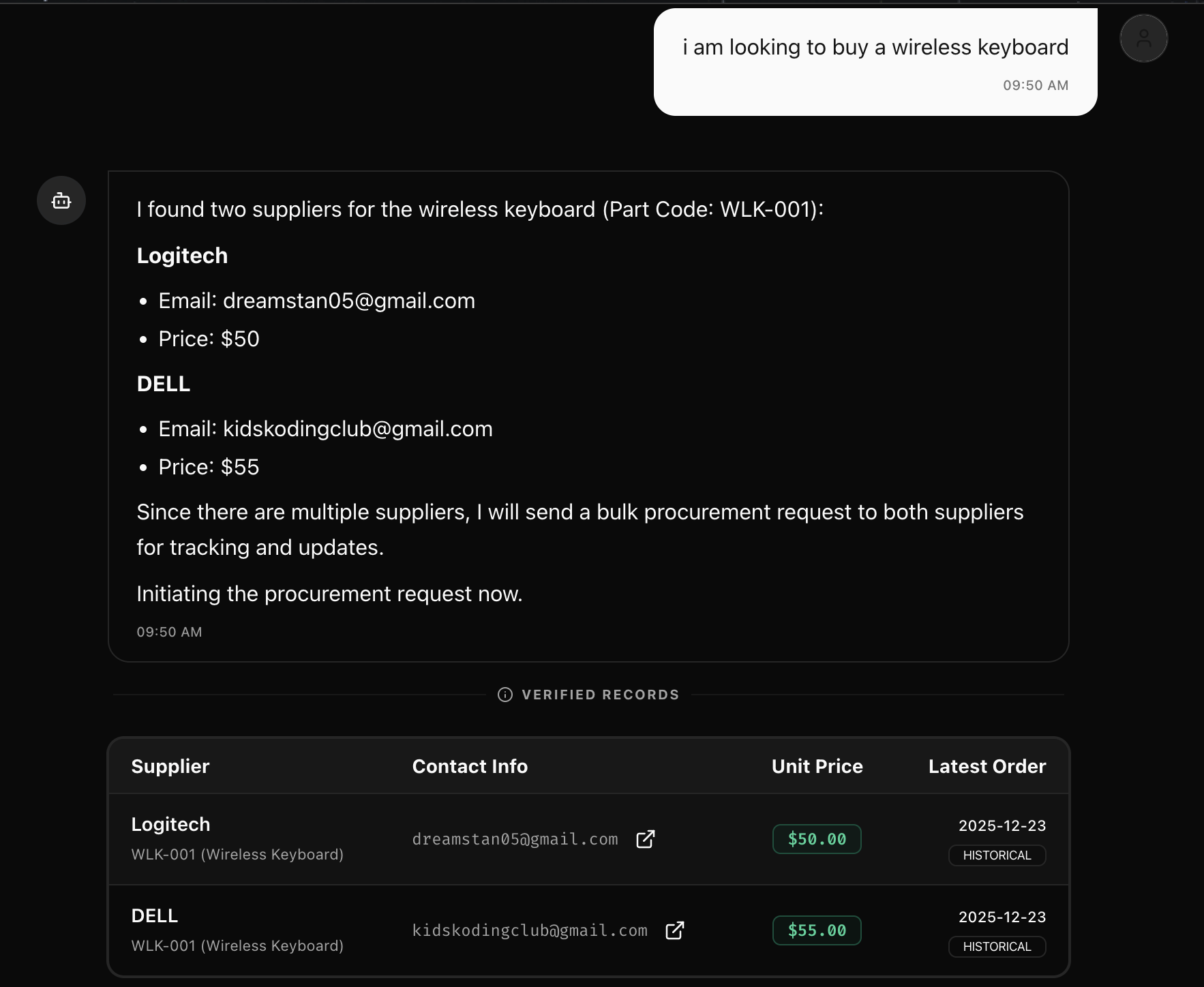
The employee describes what they need (i.e. “I am looking to buy a wireless keyboard”)
-
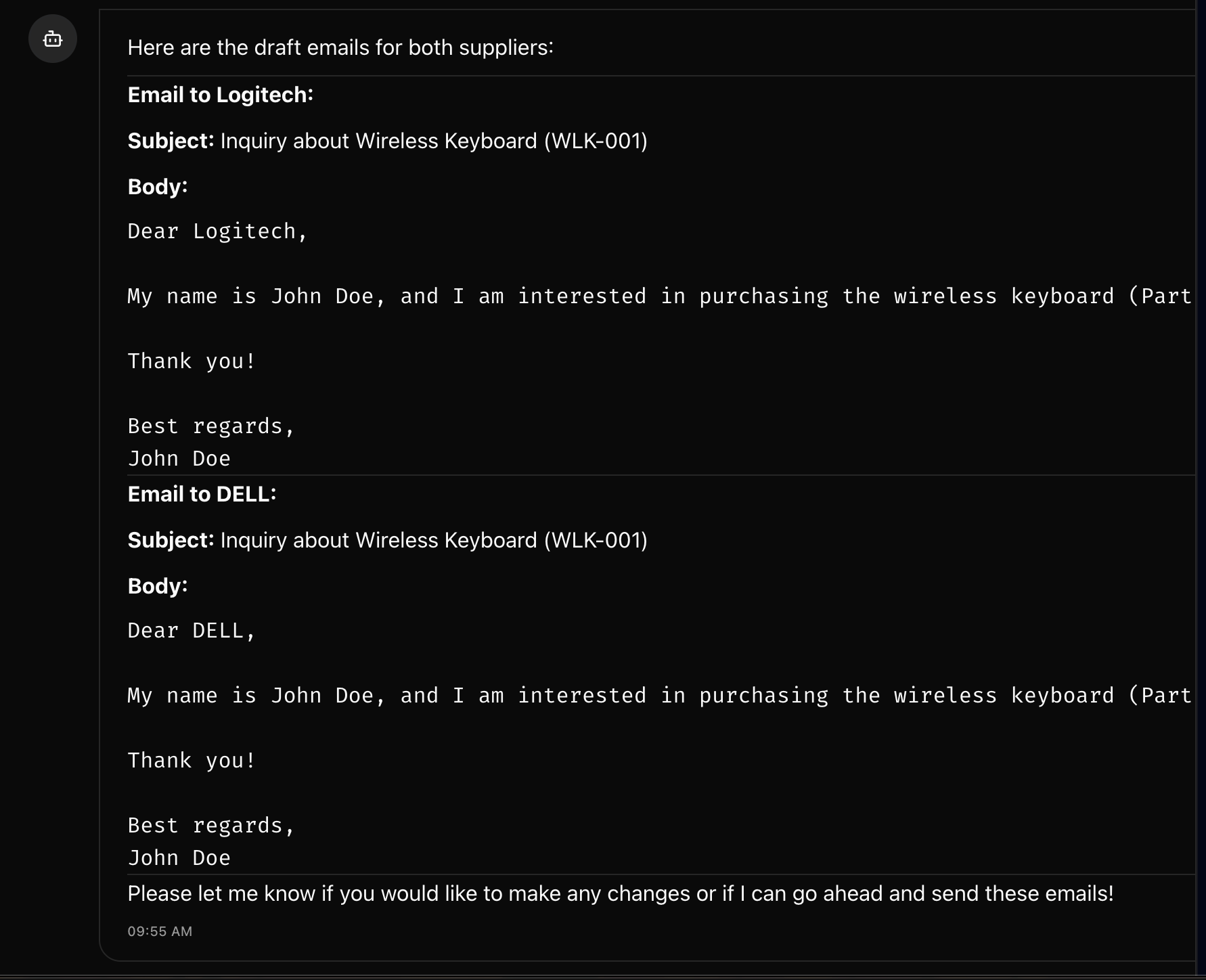
The employee, suppose its name is John Doe, then asks the Procurement AI Agent to show them an email that it will send to both suppliers (mimicing Logitech and DELL for the purpose of this demonstration) verifying the quantity in stock along with the confirmed price they are selling it at

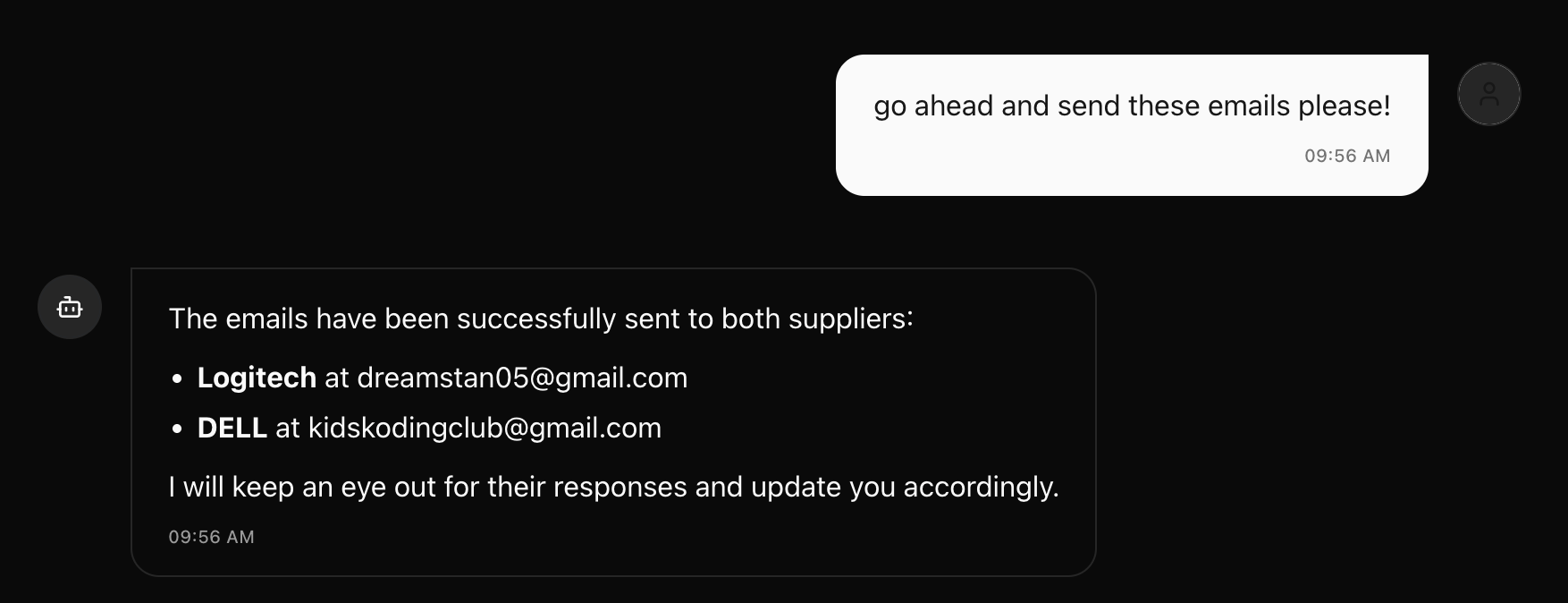
- If the employee is satisfied with the emails, they can request the Procurement AI Agent to send the emails to both suppliers
Both suppliers (mimicing Logitech and DELL for this demonstration) then receive an email in their inbox from the employee
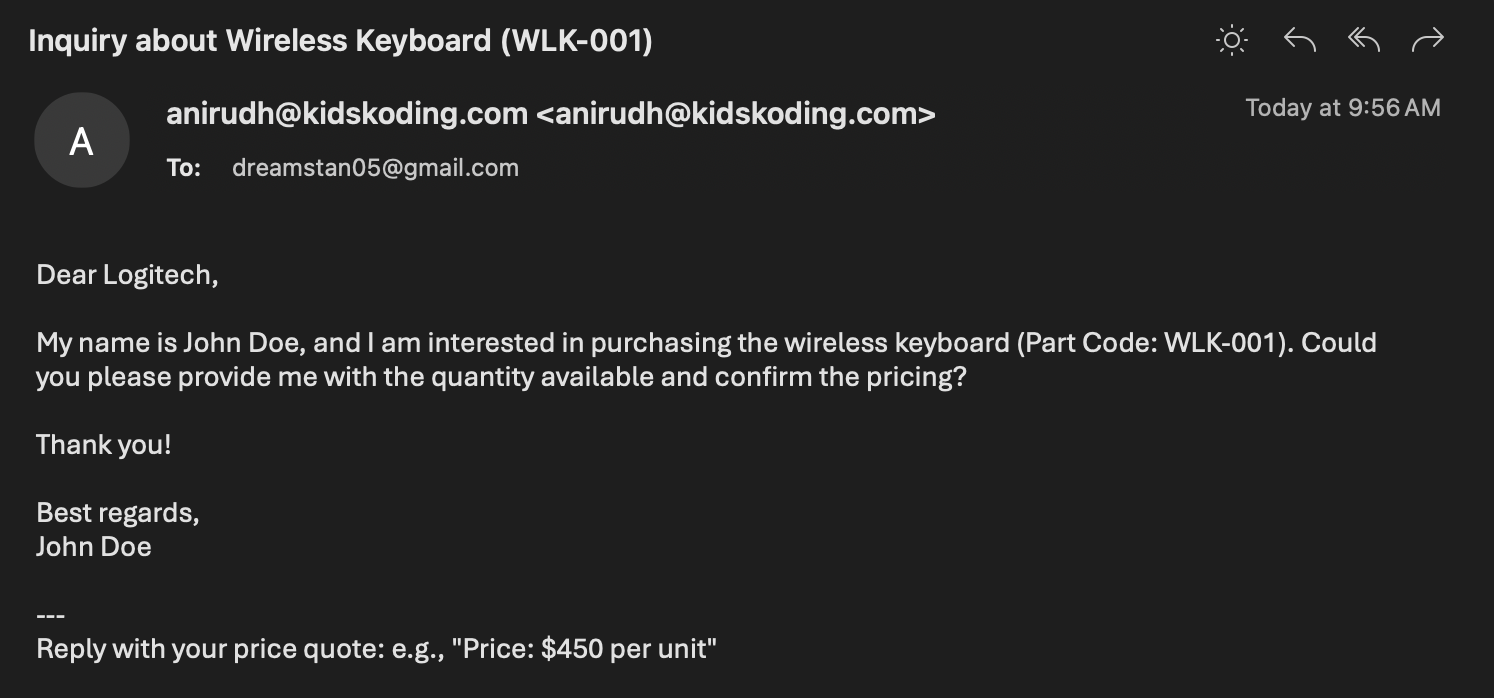
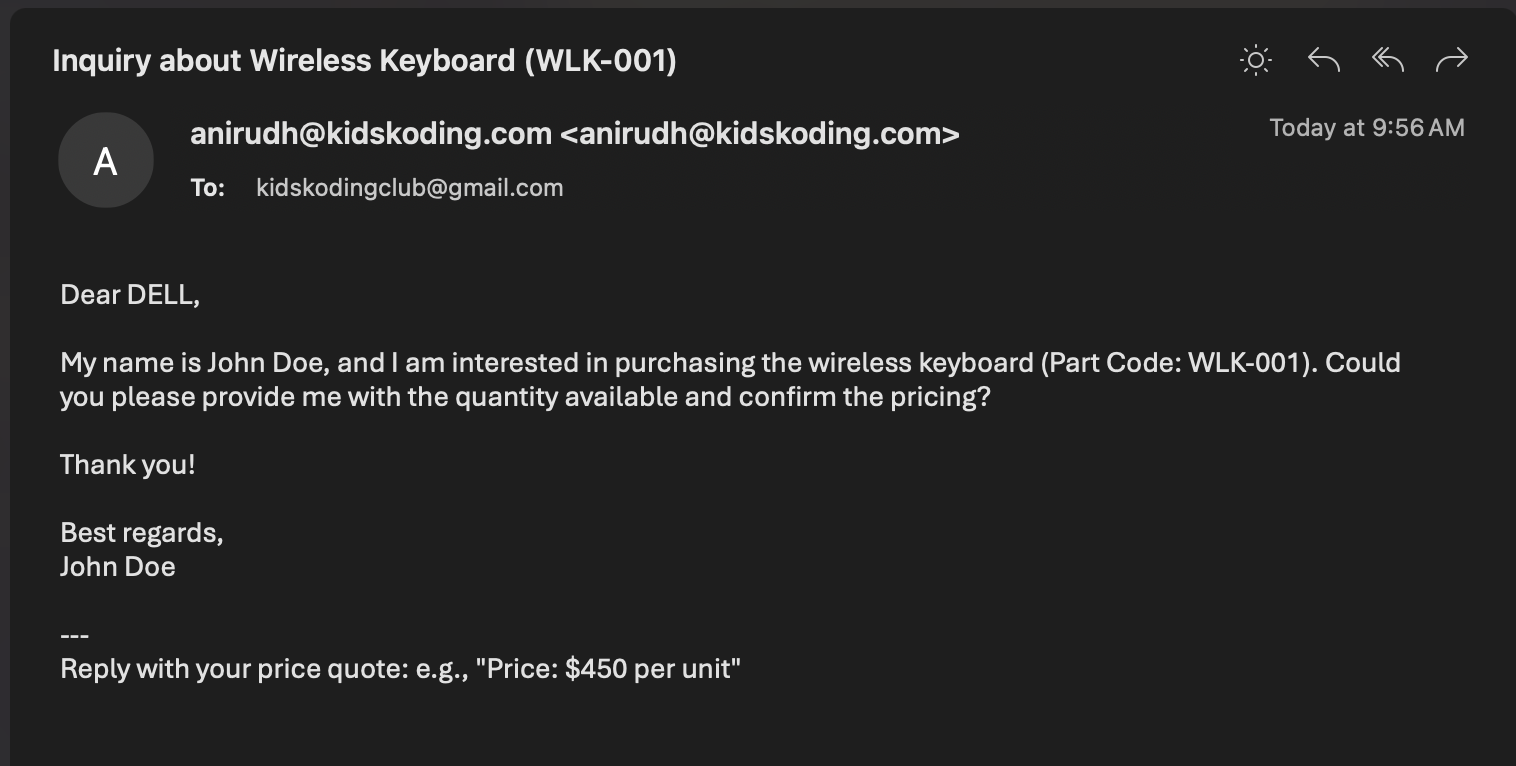
Suppliers can then respond to these emails confirming the price and quantity of the wireless keyboard that they are selling
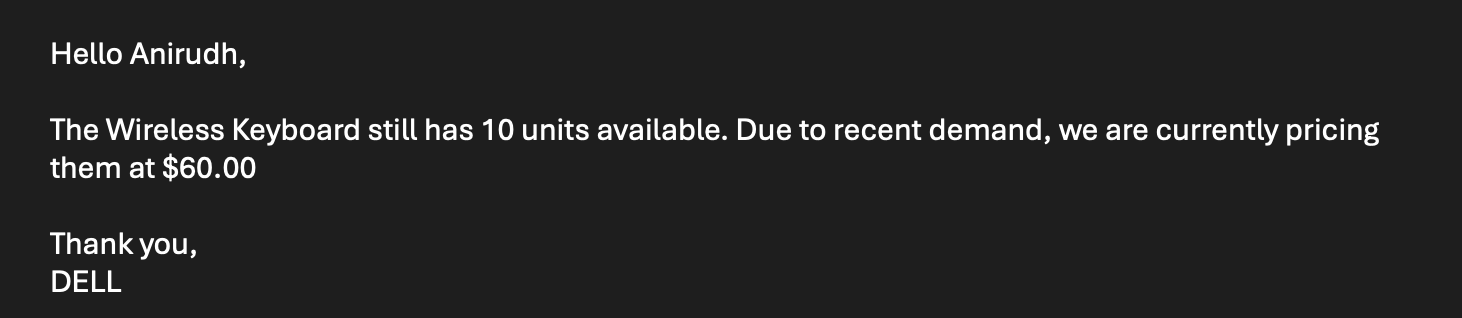
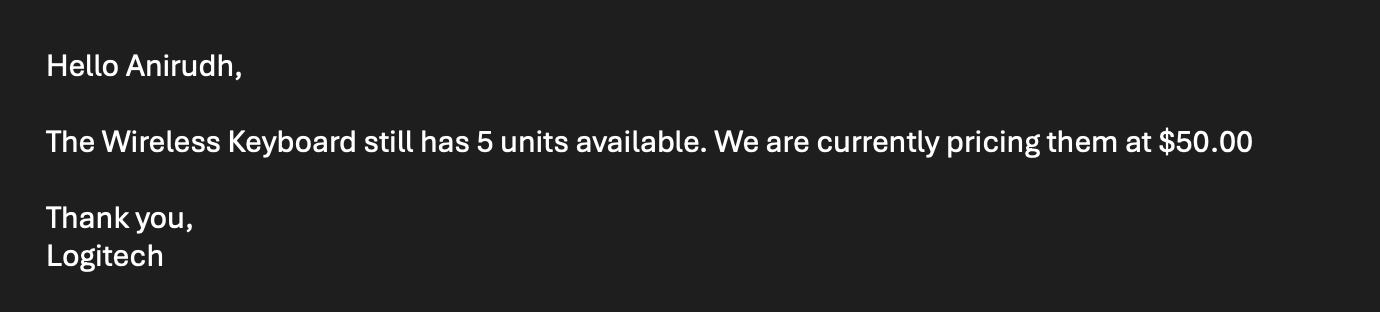
Once the suppliers have responded, the agent will update in chat with the responses from the suppliers, giving the best price the user can buy a wireless keyboard
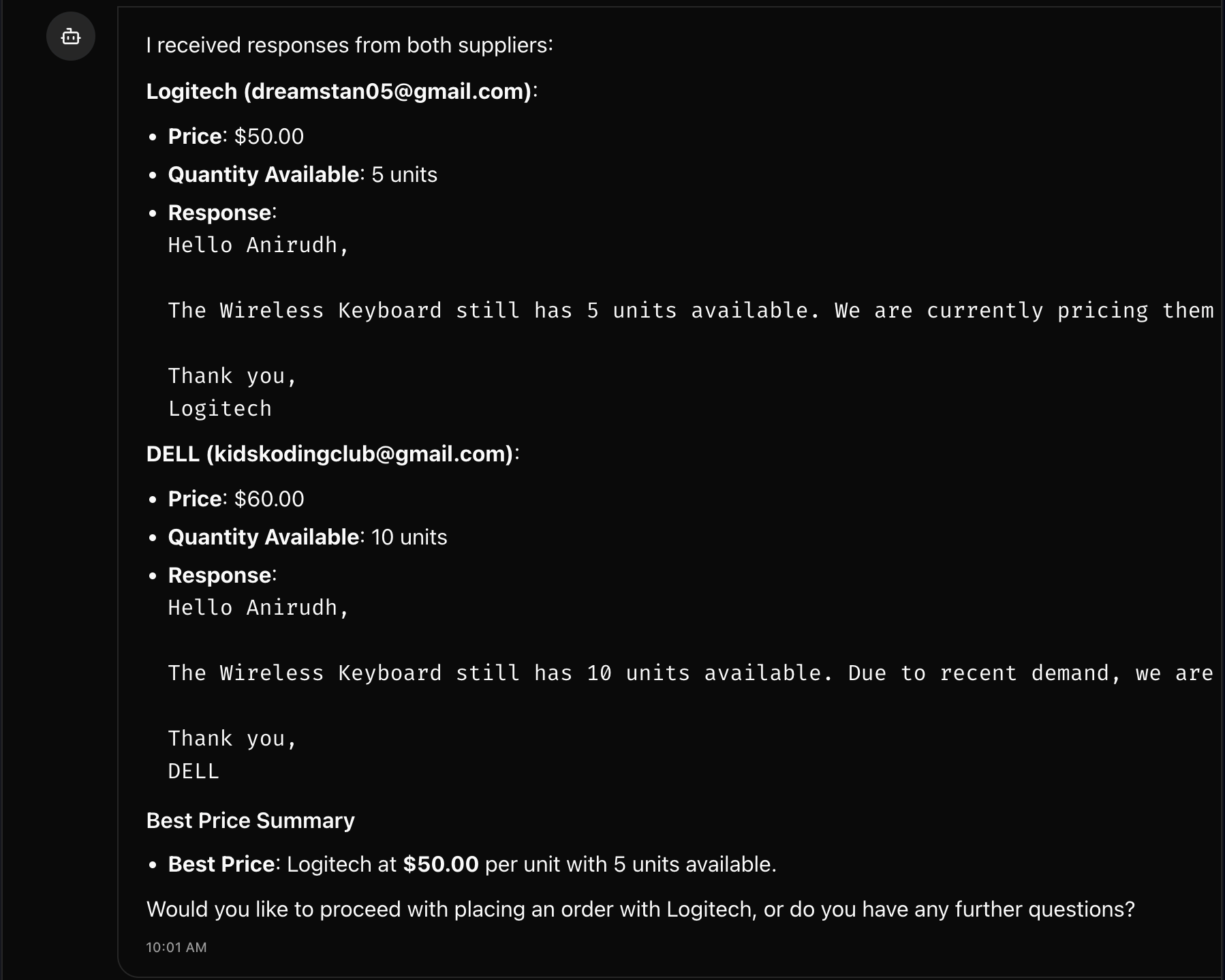
The user can then choose whether or not they would like to place an order!
Installation Instructions - How to Run
Prerequisites
- Node.js 18
- Bun (install via
npm install -g bun) - Wrangler CLI (install via
npm install -g wrangler) - Cloudflare account (free tier supports Durable Objects with migrations)
- OpenAI API key
- Resend API key
NOTE: For Bun and Wrangler, it also is possible to use
npxto execute the package directly (i.e.npx bun installornpx wrangler deploy) without installing
Development Setup
- Clone the repository - via Git
git clone git@github.com:kidskoding/cf_ai_procurement_agent.git
cd cf_ai_procurement_agent- Install dependencies - using Bun
bun install- Set up environment variables
Create a
.dev.varsfile in the root directory with:
OPENAI_API_KEY=your_openai_api_key
RESEND_API_KEY=your_resend_api_key- Run locally with Bun
bun run devThis starts the Worker and frontend on http://localhost:3000
The local environment includes:
- React frontend hot-reloading
- Worker routes at
/api/* - Local D1 database (created automatically)
- Durable Objects emulation
Building and Deploying for Production
bun run deployThis builds both the frontend (Vite) and Worker bundle and deploys them to Cloudflare Workers
Deploying will:
- Build the frontend and Worker
- Create or update D1 database tables
- Set up Durable Objects namespaces (ChatAgent, AppController)
- Deploy Worker script with all bindings
NOTE: Cloudflare account has:
- D1 database named
procurement-ai(or updatewrangler.jsonc) - Durable Objects enabled (free tier supports this with migrations)
- API keys configured in Cloudflare dashboard
Deploys to this link: https://procurement-ai-agent.anirudhkonidala.workers.dev
Database Schema
The D1 database auto-creates three tables on first deployment:
- Parts: Supplier and part history for RAG-based discovery
- PurchaseOrders: Tracks procurement requests with session_id
- SupplierResponses: Stores supplier quotes with deduplication
See worker/core-utils.ts for the complete schema and initialization logic.